


Camera Lens Adapter Ring for Fujifilm G Mount (GFX) Cameras
| P/N | Description | Compatible Lens | Compatible Camera | Picture |
| LC8111 | Mount Adapter Ring L/R-GFX | Leica R lenses | Fujifilm G Mount (GFX) Cameras | https://tf.jdy.com/fileserver/jdyattachmentimage/1667279785427746831/791124919374/1667279785427746831/pulic/imageList/uhPFelUqYJLZrvz2rB/SLC8111_7a_thumbnails_scalePic.jpg |
| LC8112 | Mount Adapter Ring M42-GFX | M42 screw mount lens | Fujifilm G Mount (GFX) Cameras | https://tf.jdy.com/fileserver/jdyattachmentimage/1667279785427746831/791124919374/1667279785427746831/pulic/imageList/Sde2FmF9WcvIk7SRoY/SLC8112_7a_thumbnails_scalePic.JPG |
| LC8113 | Mount Adapter Ring C/Y-GFX | Contax Yashica Lens | Fujifilm G Mount (GFX) Cameras | https://tf.jdy.com/fileserver/jdyattachmentimage/1667279785427746831/791124919374/1667279785427746831/pulic/imageList/y2EYNJYY8LA1u34y9o/SLC8113_7a_thumbnails_scalePic.jpg |
| LC8114 | Mount Adapter Ring HB-GFX | Hasselblad V mount CF series lenses | Fujifilm G Mount (GFX) Cameras | https://tf.jdy.com/fileserver/jdyattachmentimage/1667279785427746831/791124919374/1667279785427746831/pulic/imageList/AH5P5i8tckQESfknzp/SLC8114_7a_thumbnails_scalePic.jpg |
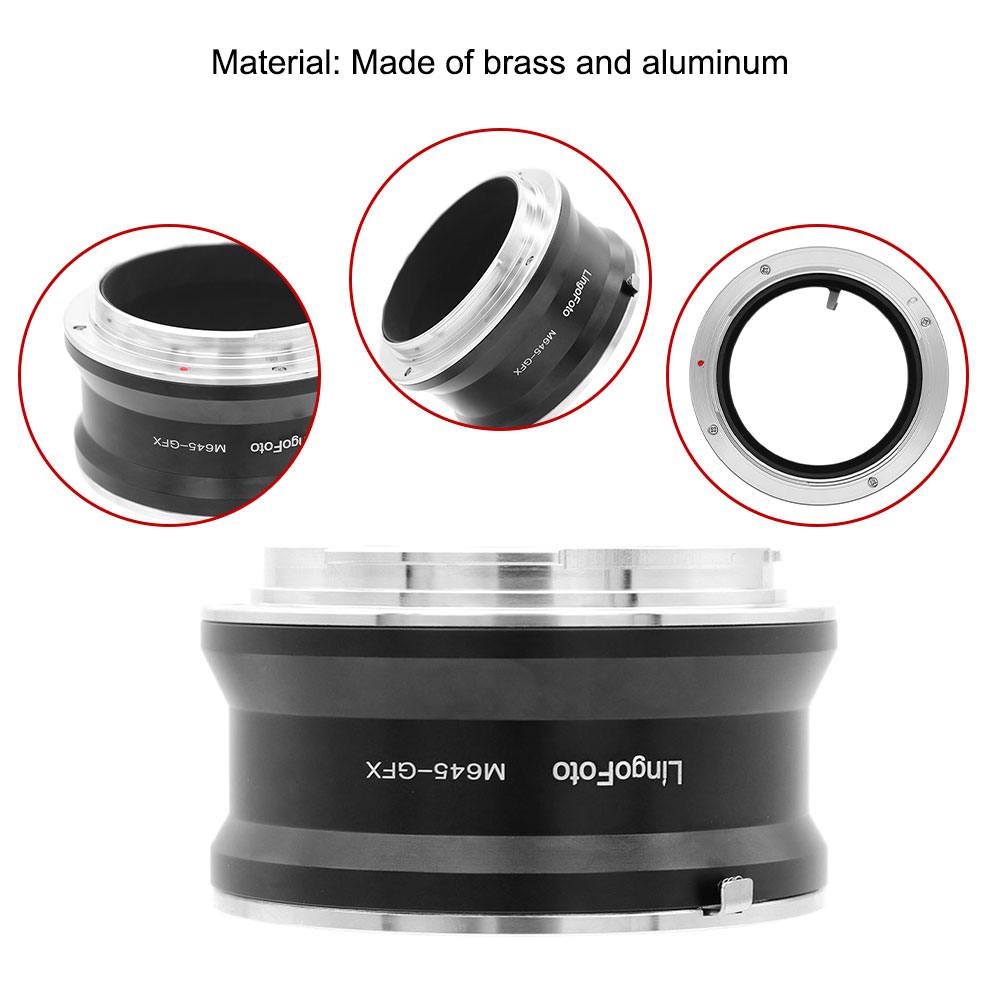
| LC8115 | Mount Adapter Ring M645-GFX | Mamiya 645 manual lens | Fujifilm G Mount (GFX) Cameras | https://tf.jdy.com/fileserver/jdyattachmentimage/1667279785427746831/791124919374/1667279785427746831/pulic/imageList/VNzzoINgw5CM84ad34/SLC8115_7b_thumbnails_scalePic.jpg |
| LC8116 | Mount Adapter Ring P60-GFX | Pentacon 6 / Kiev 60 mount lenses | Fujifilm G Mount (GFX) Cameras | https://tf.jdy.com/fileserver/jdyattachmentimage/1667279785427746831/791124919374/1667279785427746831/pulic/imageList/vpaNxWOjxmfmlgziV1/SLC8116_7c_thumbnails_scalePic.jpg |
| LC8117 | Mount Adapter Ring PL-GFX | Arri PL Mount Lens | Fujifilm G Mount (GFX) Cameras | https://tf.jdy.com/fileserver/jdyattachmentimage/1667279785427746831/791124919374/1667279785427746831/pulic/imageList/SEZTiL5zjMLsGyfDRz/SLC8117_7b_thumbnails_scalePic.jpg |
| LC8161 | Mount Adapter Ring EOS-GFX | Canon EOS EF EF-S Mount Lens | Fujifilm G Mount (GFX) Cameras | https://tf.jdy.com/fileserver/jdyattachmentimage/1667279785427746831/791124919374/1667279785427746831/pulic/imageList/VDgqCUrpOQFZifZax9/SLC8161_7a_thumbnails_scalePic.jpg |
| LC8162 | Mount Adapter Ring FD-GFX | Canon FD FL Lens | Fujifilm G Mount (GFX) Cameras | https://tf.jdy.com/fileserver/jdyattachmentimage/1667279785427746831/791124919374/1667279785427746831/pulic/imageList/U2J4dNiXf9kMkzOaqE/SLC8162_7a_thumbnails_scalePic.jpg |
| LC8163 | Mount Adapter Ring N/G-GFX | Nikon G series lenses | Fujifilm G Mount (GFX) Cameras | https://tf.jdy.com/fileserver/jdyattachmentimage/1667279785427746831/791124919374/1667279785427746831/pulic/imageList/shDMY6SeK1UgMcacAK/LC8163_7a_thumbnails_scalePic.jpg |
| LC8164 | Mount Adapter Ring MD-GFX | Minolta MD MC Lens | Fujifilm G Mount (GFX) Cameras | https://tf.jdy.com/fileserver/jdyattachmentimage/1667279785427746831/791124919374/1667279785427746831/pulic/imageList/lqwC8JBno9x10zU4P1/SLC8164_7f_thumbnails_scalePic.jpg |
| LC8165 | Mount Adapter Ring OM-GFX | Olympus OM lens | Fujifilm G Mount (GFX) Cameras | https://tf.jdy.com/fileserver/jdyattachmentimage/1667279785427746831/791124919374/1667279785427746831/pulic/imageList/YFMTPNx1M1hDtEOIZJ/SLC8165_7a_thumbnails_scalePic.jpg |
| LC8166 | Mount Adapter Ring PK-GFX | Pentax K Mount lenses | Fujifilm G Mount (GFX) Cameras | https://tf.jdy.com/fileserver/jdyattachmentimage/1667279785427746831/791124919374/1667279785427746831/pulic/imageList/no6Nt7SV6bKecQ6Fp8/SLC8166_7a_thumbnails_scalePic.jpg |
| LC8167 | Mount Adapter Ring PK645-GFX | Pentax 645 Lens | Fujifilm G Mount (GFX) Cameras | https://tf.jdy.com/fileserver/jdyattachmentimage/1667279785427746831/791124919374/1667279785427746831/pulic/imageList/AUV0PIXEBY00B24KJq/SLC8167_7b_thumbnails_scalePic.jpg |
| LC8168 | Mount Adapter Ring L/M-GFX | Leica M lenses | Fujifilm G Mount (GFX) Cameras | https://tf.jdy.com/fileserver/jdyattachmentimage/1667279785427746831/791124919374/1667279785427746831/pulic/imageList/IGaJcIbOyvXXfWlh5p/SLC8168_7f_thumbnails_scalePic.jpg |
| NP8421 | Mount Adapter Ring B4-GFX | 2/3"B4 Camecorder Lens | Fujifilm G Mount (GFX) Cameras | https://tf.jdy.com/fileserver/jdyattachmentimage/1667279785427746831/791124919374/1667279785427746831/202508/5ba045/pulic/imageList/zOC2il2LHGW9ynSZ5q/NP8421_e_thumbnails_scalePic.jpg |
Think of your GFX as a universal lens hub.
The list shows just how versatile your camera can be:
Go Full Medium Format: Use classic Hasselblad V (LC8114), Mamiya 645 (LC8115), or Pentax 645 (LC8167) lenses. These were made for medium format film, so they cover your sensor beautifully and give you that timeless look.
Try Classic SLR Lenses: Grab your old Nikon G (LC8163), Canon EF or FD (LC8161, LC8162), Pentax K (LC8166), or Minolta MD (LC8164) lenses. It’s a fantastic way to use the glass you already love on a much larger sensor.
Experiment with Cine & Speciality Glass: For a truly unique look, you can even mount professional Arri PL (LC8117) cinema lenses or B4 broadcast (NP8421) video lenses.
Explore Other Legends: The list includes adapters for iconic systems like Leica M and R (LC8168, LC8111), Contax/Yashica (LC8113), and the universal M42 screw mount (LC8112).
But Keep in mind:
It’s Manual Everything: These adapters are simple mechanical rings. You’ll be setting the aperture on the lens itself and focusing manually—no autofocus or electronic communication.
Use Your GFX’s Superpowers: This is where features like Focus Peaking and Digital Microprism become your best friends, helping you nail focus every time.
Watch the Crop: Most of these lenses will work in a special “35mm format mode” on your GFX, which uses a smaller portion of the sensor. Some wider lenses might show dark corners (vignetting). Think of it as a fun way to test a lens’s “image circle.”
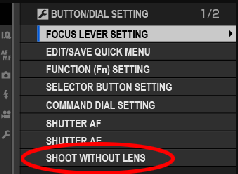
Some times"NO LENS ATTACHED" may happen for this Fujifilm G Mount (GFX) Cameras after using our adapter ring, here are some tips might be helpful:
The camera needs to be set to function without a GFX-Mount lens attached. You can do this by changing the following camera setting:
'MENU' -> 'SETUP' -> 'BUTTON/DIAL SETTING' -> 'SHOOT WITHOUT LENS' -> 'ON' (Exact naming and location of this option may change depending on camera model)
Choose ON to enable the shutter release when no lens is attached.
Your GFX isn’t just for GF lenses. With these affordable adapters, it becomes the ultimate creative platform. You can mix the stunning image quality of a medium format sensor with the unique character of decades-old optics. It’s the perfect way to experiment and find a look that’s truly your own.
Ready to give an old lens a new life on your amazing camera? Just pick the right adapter and start shooting.


